
Recent Posts
Categories
Stay Informed

For most small businesses, a website feels like something that should simply work.
Customers visit it. Leads come through it. Forms submit. Phones ring. Orders process. Appointments get booked. Life moves on.
Until it doesn’t.
Recently, Microsoft confirmed that a May 2026 Windows 11 security update caused problems for users. The update, which was meant to improve security, failed to install on certain systems and triggered rollback errors.
Updates and maintenance are necessary. Your website, hosting environment, plugins, themes, security tools, and server software all need to be kept current. But even routine updates can create problems if they are not monitored, tested, or handled correctly.
A failed update may not seem like a big deal at first, but in a website environment it can lead to broken pages, plugin conflicts, security gaps, downtime, email issues, or customers being unable to complete forms, purchases, or quote requests.
Microsoft is one of the largest technology companies in the world, with massive resources and enterprise-level systems. But even at that scale, a routine security update still created real issues for some users.
If maintenance problems can happen at that level, they can absolutely happen to a small business website.
And when they do, the margin for error is much smaller.
Your Website Is More Than a Digital Brochure
A lot of small business owners still think of their website as a simple marketing tool. It is the place people go to learn who you are, what you do, and how to contact you.
But in reality, your website is often much more than that.
It may be where customers:
- Find your phone number
- Submit quote requests
- Book appointments
- Make purchases
- Read reviews
- View your services
- Fill out forms
- Access customer portals
- Decide whether or not they trust your business
When your website goes down, all of that stops.
A down website does not just mean a broken page. It means lost leads, frustrated customers, missed revenue, and a weaker first impression for anyone trying to find you online.
For a small business, that pain can be felt quicker than you think.
The Real Cost of Website Downtime
When hosting fails, the impact is not always obvious right away.
You may not immediately know how many people tried to visit your site. You may not know how many quote requests never came through. You may not know how many customers clicked away and chose a competitor instead.
But the cost is real.
Website downtime can lead to:
- Lost sales or leads
- Missed phone calls
- Failed form submissions
- Damaged customer trust
- Lower confidence in your brand
- Wasted ad spend if you are running PPC campaigns
- Search engine issues if outages happen repeatedly
- Internal frustration as your team tries to figure out what went wrong
If your website is connected to online ordering, scheduling, payments, or customer communication, the damage can be even greater.
A local contractor may miss out on quote requests. A medical practice may lose appointment submissions. A restaurant may miss catering inquiries. An e-commerce shop may lose orders. A professional services firm may look unreliable to a potential client.
The business does not stop needing customers just because the website is offline.
Big Companies Have Hosting Problems Too
In October 2025, Amazon Web Services experienced a major outage that disrupted websites and apps around the world, including services like Snapchat, Reddit, Zoom, Venmo, Fortnite, Coinbase, Robinhood, Prime Video, and Alexa. Reuters reported that the outage affected businesses globally and highlighted how dependent many organizations are on a small number of cloud infrastructure providers.
Cloudflare has also experienced outages that affected major platforms. In December 2025, AP reported that a Cloudflare outage impacted sites including Zoom and LinkedIn, with Cloudflare saying the issue was caused by a misconfiguration tied to planned maintenance, not a cyberattack.
And this is not just a large enterprise issue. GoDaddy, one of the most well-known hosting and domain providers, experienced a major outage in 2012 that affected small business websites and email. One small business employee told ABC that they ran their entire business through their websites and email, both of which were impacted.
The point is not that these companies are bad. The point is that hosting, infrastructure, maintenance, DNS, security, and uptime all matter.
Even large providers can have problems.
That means small businesses need to take hosting seriously instead of assuming the cheapest option is good enough.
Cheap Hosting Can Become Expensive Fast
Low-cost hosting may seem fine when everything is working.
But the true value of hosting is not just the monthly price. It is what happens when something goes wrong.
Cheap or poorly managed hosting can create problems like:
- Slow website load times
- Frequent downtime
- Poor support
- Weak security
- Limited backups
- Outdated server environments
- Plugin or software conflicts
- Poor scalability during traffic spikes
- No clear recovery plan
The problem is that many small businesses do not discover these weaknesses until there is already an issue.
Your site goes down.
Your hosting support is slow to respond.
Your backup is outdated or missing.
Your developer cannot access what they need.
Your contact forms stopped working days ago.
Your customers are asking why the site is broken.
That is when “cheap hosting” suddenly becomes expensive.
Hosting Is a Business Continuity Issue
Website hosting is not just a technical decision. It is a business continuity decision.
Good hosting helps keep your business visible, accessible, and functional. It supports your marketing, sales, customer service, and credibility.
Bad hosting puts all of that at risk.
A reliable hosting setup should include:
1. Strong Uptime and Performance
Your website should load quickly and remain available. Speed matters for both users and search engines. If your site is slow or unavailable, customers are more likely to leave.
2. Regular Backups
If something breaks, you need the ability to restore your site quickly. Backups should be consistent, secure, and easy to access when needed.
3. Security Monitoring
Hosting should include protections against malware, suspicious activity, unauthorized access, and common website attacks. Small business websites are often targeted because they are easier to exploit.
4. Software and Plugin Maintenance
Outdated WordPress versions, plugins, themes, and server software can create security and performance issues. Regular maintenance helps prevent small problems from becoming major ones.
5. Fast Support
When your website is down, you do not want to wait days for a generic support response. You need someone who can investigate the issue, explain what happened, and help get your site back online.
6. A Clear Recovery Plan
If your website broke tomorrow, would you know who to call? Would you know where the backups are? Would you know how long recovery might take?
If the answer is no, that is a risk.
Small Businesses Are Not Too Small to Be Affected
One of the biggest mistakes small business owners make is assuming they are too small for website issues to matter.
But small businesses often rely heavily on their websites.
For many, the website is the first impression. It is the sales tool. It is the lead generator. It is the credibility check. It is the place customers go before deciding whether to call.
And small businesses usually do not have a large internal IT team ready to respond when something fails.
That makes preparation even more important.
You do not need enterprise-level infrastructure to protect your business. But you do need reliable hosting, regular maintenance, backups, monitoring, and a support partner who understands what is at stake.
What Should You Do to Protect Your Business During a Hosting Outage?
A hosting outage can feel overwhelming, especially if you are not sure who controls what. But the businesses that recover fastest usually have one thing in common: they know where everything is before something breaks.
Here are a few practical steps every small business should take.
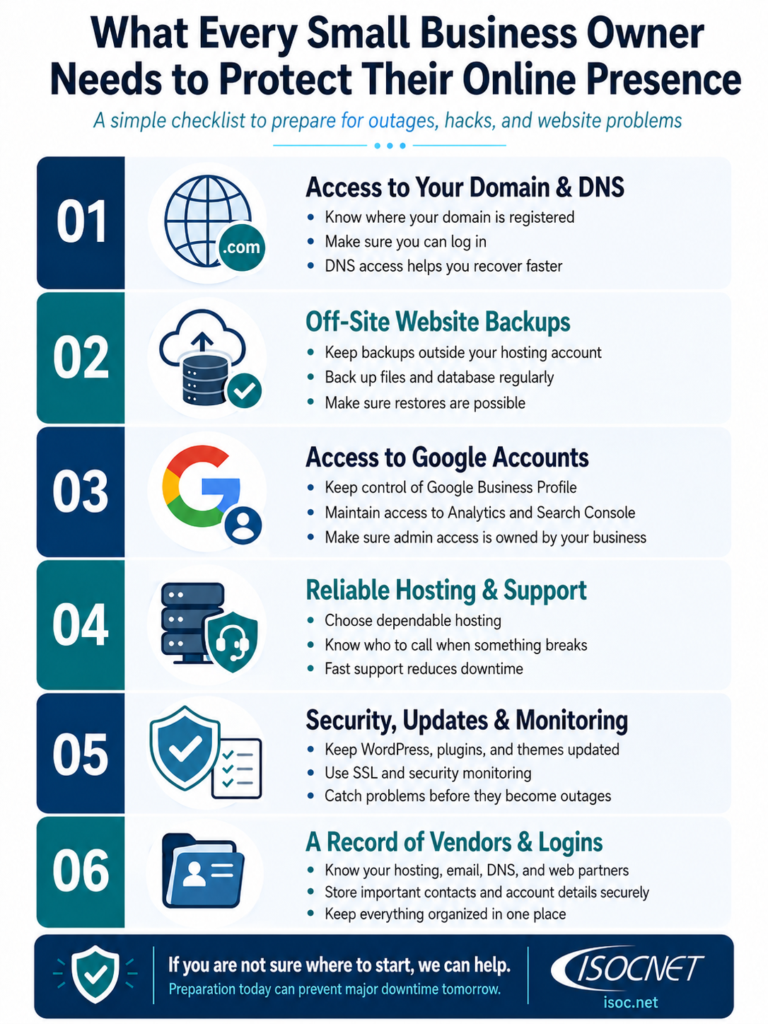
1. Make Sure You Have Access to Your Domain and DNS
Your domain is your website address, and DNS is what tells the internet where to send visitors when they type that address in.
If your website goes down and you do not have access to your domain or DNS settings, recovery becomes much harder. Your web team may not be able to point the domain to a backup site, update records, fix email routing issues, or move your website to a different hosting environment.
At minimum, you should know:
- Where your domain is registered
- Who has the login information
- When the domain renews
- Where your DNS is managed
- Who is authorized to make changes
Losing access to your domain or DNS can turn a simple hosting issue into a much larger business problem.
2. Make Sure You Have an Off-Site Backup of Your Website
Backups are one of the most important pieces of website protection. But not all backups are equal.
If your only backup is stored on the same hosting account that goes down, gets hacked, or becomes inaccessible, it may not help you when you need it most.
An off-site backup means your website files and database are stored somewhere separate from your main hosting environment. That gives you a recovery option if your host has an outage, your site is infected with malware, or an update breaks something important.
For most small businesses, a good backup plan should include:
- Regular scheduled backups
- Website files and database backups
- Storage outside of the main hosting account
- A clear restore process
- Someone who knows how to use the backup if needed
The goal is simple: if your website breaks, you should not be starting from scratch.
3. Make Sure You Have Access to Your Google Accounts
Many businesses rely on Google services without realizing how connected they are to the website.
Your Google accounts may control or connect to:
- Google Business Profile
- Google Analytics
- Google Search Console
- Google Ads
- Gmail or Google Workspace
- YouTube
- Tag Manager
- Website verification records
If your site goes down, these accounts can help you diagnose issues, communicate with customers, protect search visibility, and keep your business information accurate.
But if the only person with access is a former employee, an old vendor, or someone who no longer manages your website, you may be stuck.
Make sure your business owns the account access, not just a third party. You should know who the admins are, what email addresses are used, and how to recover the account if needed.
4. Know Where Everything Is
During a hosting outage, the last thing you want to do is hunt through old emails trying to figure out who manages your domain, where your website is hosted, or who has the latest backup.
Create a simple document that lists your important website and technology information.
This should include:
- Domain registrar
- DNS provider
- Website host
- Website admin login
- Backup location
- Google account access
- Email provider
- Website developer or support contact
- Key software, plugins, or platforms
- Vendor and supplier contact information
This does not need to be complicated. Even a basic spreadsheet or secure password manager can make a huge difference.
When something goes wrong, speed matters. Knowing where everything is can save hours, reduce confusion, and help your team respond faster.
Helpful Tools and Resources to Have in Place
You do not need to manage every website risk manually. A few simple tools and resources can make a major difference when something goes wrong.
Start with the basics:
Uptime monitoring: Tools like UptimeRobot, Pingdom, or Better Stack can alert you when your website goes down, so you can respond before customers start calling.
Domain, DNS, and email checks: Tools like MXToolbox.com can help you quickly check DNS records, email settings, blacklist status, and other domain-related issues that may affect your website or business email.
Off-site backups: Make sure your website files and database are backed up somewhere outside your hosting account. If your host has an issue, you still have a recovery option.
Password manager: Tools like 1Password or Bitwarden can securely store access to your domain, DNS, hosting, Google accounts, website admin, and vendor information.
Google account access: Your business should have control of Google Business Profile, Google Analytics, Google Search Console, and any Google Workspace accounts tied to your company.
Security and maintenance tools: If your site runs on WordPress, tools like Wordfence, Sucuri, or ManageWP can help monitor security issues, updates, and potential vulnerabilities.
Internal documentation: Keep a simple, secure record of where everything lives: your domain registrar, DNS provider, website host, backup location, support contacts, and key logins.
The goal is not to make things complicated. The goal is to make sure that if your website goes down, you know what you have, where it is, and who to call.
If You Are Not Sure Where to Start, We Can Help
Most small business owners are busy running their business. They are not thinking about DNS records, off-site backups, hosting environments, Google account permissions, or recovery plans every day.
That is exactly why it helps to have a partner who can review your setup, identify gaps, and make sure the right safeguards are in place before there is an emergency.
If you are not sure who controls your domain, where your website is backed up, or what would happen if your hosting went down tomorrow, we can help you figure it out.
A little preparation now can prevent a much bigger problem later.
Trust Is Easy to Lose
When a customer visits your website and it does not work, they may not know why.
They do not know if it is a hosting issue, a DNS issue, a plugin conflict, or a server problem.
They just know the site is broken.
And fair or not, that reflects on your business.
If someone is comparing you to a competitor, a broken website can be enough to lose the opportunity. If an existing customer needs support and cannot reach you, it can create frustration. If your site goes down repeatedly, it can make your business appear unreliable.
Carnival’s issue was not just about a technical failure. It became a trust issue. Customers felt confused, frustrated, and let down.
The same thing can happen on a smaller scale with any business.
Reliable Hosting Is Not Optional Anymore
Your website is one of the most important pieces of your business infrastructure.
It deserves more than the cheapest hosting plan and occasional updates when something breaks.
A strong hosting and maintenance strategy helps protect your business from avoidable downtime, security issues, lost leads, and customer frustration.
That includes:
- Reliable hosting
- Ongoing website maintenance
- Security monitoring
- Regular backups
- Software updates
- Performance checks
- Fast support
- A plan for recovery if something goes wrong
You may not be able to prevent every issue. Even the largest technology providers experience outages.
But you can reduce your risk. You can recover faster. You can protect your customers’ experience. And you can avoid being caught off guard when your website matters most.
Is Your Website Protected?
If your website went down tomorrow, would you know what to do?
Would you know who to call?
Would you have a recent backup?
Would your customers still be able to reach you?
Would your business lose leads while you tried to figure it out?
For small businesses, reliable hosting is not just about keeping a website online. It is about protecting revenue, reputation, and customer trust.
Because when your website fails, your customers do not see a hosting problem.
They see a business problem.
Ready to make sure your website is secure, reliable, and properly supported? Let’s talk.